nexBash4
nexBash4 is bashing automation for Achaea in the Nexus web client. It scans rooms for valid targets, selects an attack and battlerage from the active class strategy, and keeps a run moving using live character state from nexSys4.
Version 4 is a ground-up rebuild on XState v5. Its public contract is deliberately small:
nexBash
|-- state     frozen, serializable snapshot
|-- api       domain-oriented functions
`-- options   persisted global option flags
It is not a drop-in rename of nexBash3. The decision engine, state model, and configuration UI are new.
The state machine
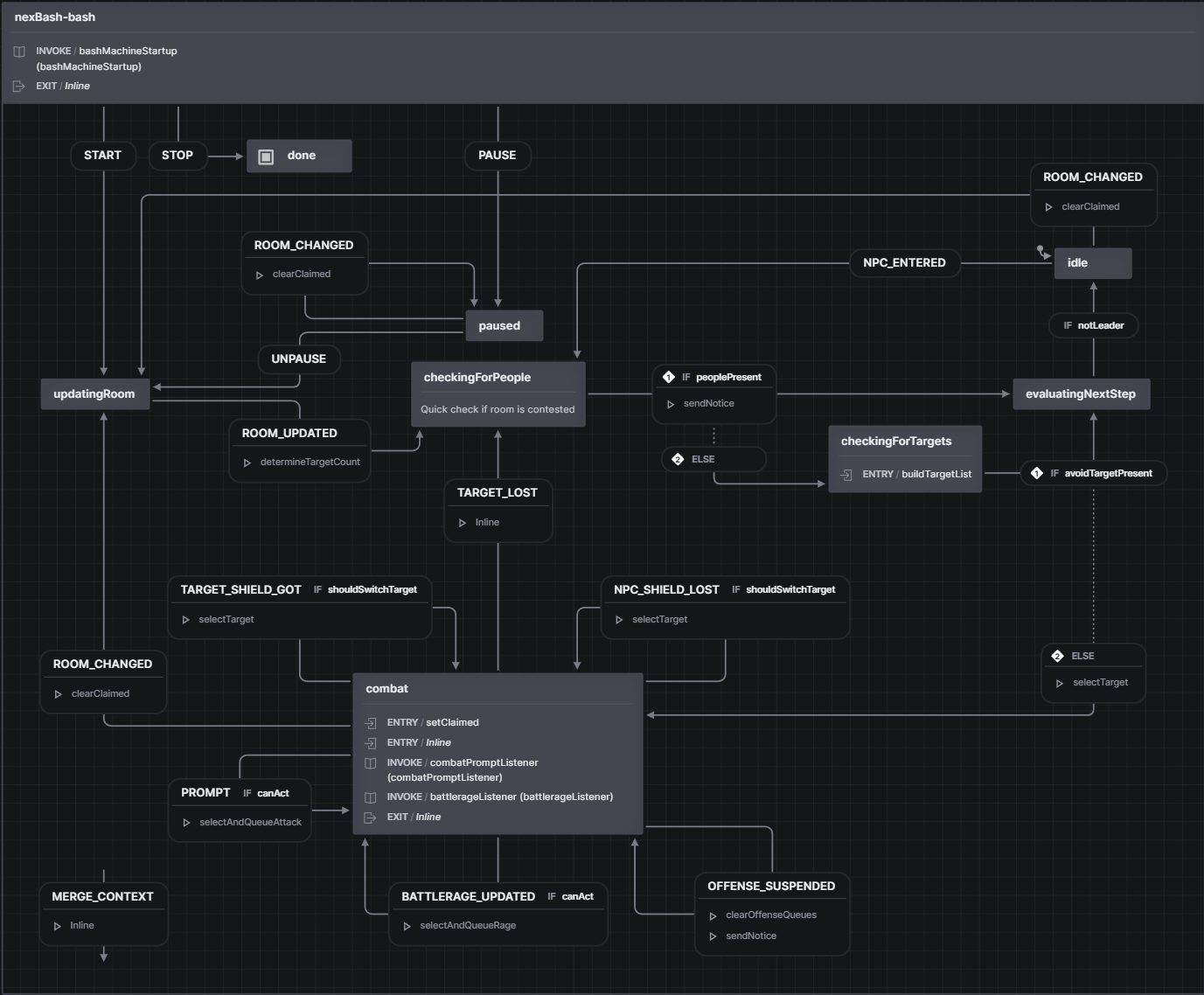
The core nexbash-bash machine manages room updates, player checks, target
selection, combat prompt/rage handlers, pathing, and pause/resume behavior:
What it does
- Tracks areas: matches location to a registered area and applies target settings and priorities.
- Selects targets: builds the room combatant list and engages the best valid target.
- Chooses attacks: evaluates a curated lane with pure gates and precomputed profile tuning, then queues the first legal ability.
- Drives battlerage: runs autonomous and coupled rage paths within configured reserves.
- Keeps you safe: flies, flees, shields, razes, swaps off shielded targets, and runs effect automations.
- Reviews mob data: records observations for later NPC metadata review.
- Scores the run: tracks kills, gold, and elapsed time and reports a summary.
How it relates to nexSys4
nexBash4 is a layer on top of nexSys4. nexSys4 owns character state, curing, and command queues; nexBash4 queries that state and uses those queues to fight. nexSys4 must be installed and running. See Installation.
Supported classes
The current shipped strategy set is Depthswalker, Magi, Occultist,
Psion, Black Dragon, Blue Dragon, Red Dragon, Golden Dragon,
and Fire Lord. nexBash selects the matching strategy automatically. An
unsupported class still navigates and selects targets but does not queue class
attacks. Type nb help for the installed build's live supported set.
Where to begin
New users should follow Installation, then the Quickstart. The Guides explain configuration, the decision model, strategies, and complete profile variants.
Package authors and advanced users can start at the Reference overview.