Side streams
nexGui4 has two side-stream panels in addition to the main display:
- System (
nexSystem) - Combat (
nexCombat)
Each is a separate transcript view backed by its own model. Normal host output still flows through the main display; a row appears in a side stream only when something explicitly routes a line into it.
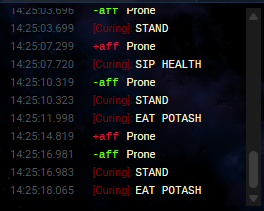 The System stream rendering defence and affliction events.
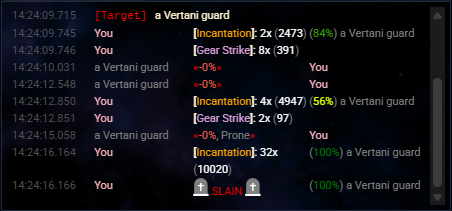 The Combat stream displaying skill replacement rows and target info.
Stream toggles
The System Stream toggle on the Game options tab
enables or disables the nexGui.stream settings group in the Nexus nexGui4
package. Its saved value is restored at startup and reapplied after the package
update. Combat Stream currently persists UI state only.
These toggles do not by themselves reroute arbitrary game output into the side streams. Lines appear in a side stream when a supported event reaches the message pipeline, or when code writes directly to the stream.
Events that already render into streams
When these events reach the nexGui4 message pipeline, they produce side-stream rows:
| Event | Stream | Renders |
|---|---|---|
Char.Defences.Add | System | a +def row |
Char.Defences.Remove | System | a -def row |
Char.Afflictions.Add | System | a +aff row |
Char.Afflictions.Remove | System | a -aff row |
IRE.Target.Info | Combat | a target status row |
nexskill.match / nexskill.match.npc | Combat | a structured skill-replacement row |
If your message fits one of these contracts, raise the event and let the existing bindings format it:
eventStream.raiseEvent("Char.Defences.Add", {
  name: "rebounding",
  desc: "A shimmering shield surrounds you.",
});
nexskill.matchnexskill.match / nexskill.match.npc depend on the host replacement handler
running during live line processing. nexskill.match is emitted for both skill
and NPC matches, so nexGui4 only consumes it for skill replacement when the
payload has skill; NPC replacement rows use nexskill.match.npc. Raising
these events from arbitrary code outside a live output block will not render a
combat row — write the row directly instead.
Writing a custom row
For custom rows from scripts or other packages, use the public stream API:
nexGui.api.stream.add({
  html: "<span>[note] something happened</span>",
  stream: "system", // or "combat"
});
htmlis the trusted row markup.streammust be"system"or"combat".- A timestamp is generated and rendered by the panel; do not include timestamp
markup in
html.
See nexGui.api.stream for the full
contract.