Area Configuration
The Area Configuration tab configures settings and target priorities for each area. It contains two sub-tabs: Area Settings and Target Priorities.
Choosing the area
The Area dropdown at the top of the tab selects which area you are editing. It defaults to the area matching your current GMCP location and falls back to the first registered area. Each area's settings are independent.
To add a brand-new area, walk to it in-game and use nb addarea (see Commands); it then appears in this dropdown.
Area Settings
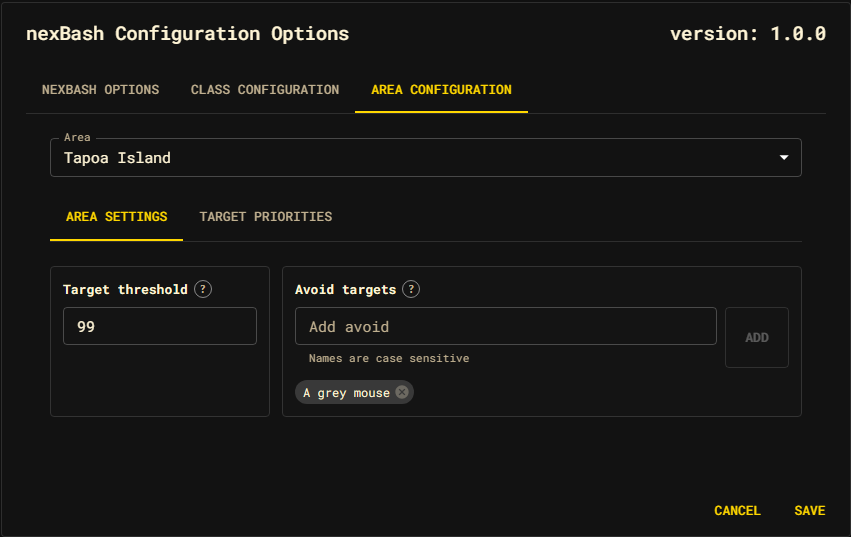
The Area Settings sub-tab configures the attacker budget, target exclusion, and lifecycle commands for the selected area:
- Maximum Attackers — The maximum number of NPC attackers nexBash may project after an action (defaults to 99). Each attacker counts as its NPC's Attacker Weight, normally 1. Room population alone does not consume this budget.
- Avoid Targets — A list of specific NPC names. If any of these NPCs are present in a room, nexBash will skip that room entirely. To add an avoid target, type its name and press Add.
- On activation — Commands sent after the area's scoped setup completes and the owned clone is live.
- On deactivation — Commands sent before the outgoing area's scoped resources are disposed.
Lifecycle automations are ordered, command-only data. Blank or unknown action shapes are rejected at the settings boundary; executable JavaScript callbacks are deliberately not persisted. External packages that need richer behavior should subscribe to the area lifecycle events.
Target Priorities
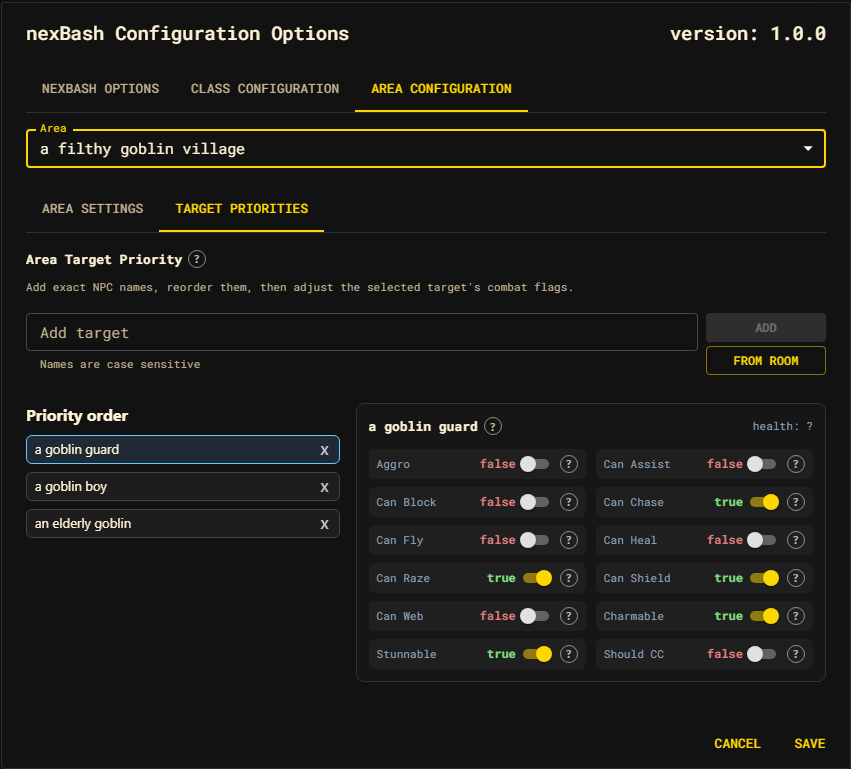
The Target Priorities sub-tab configures which mobs nexBash engages and in what order — and how it treats each one in combat.
Building the priority list
Targets are tried top to bottom for the selected area. Three ways to add one:
- Add target — type an exact, case-sensitive in-game name and press Add.
- From room — pick from a menu of the NPCs currently visible in your room (corpses and your own character are filtered out; duplicates show a count).
- Drag entries in the Priority order list to reorder them.
Select an entry to edit its NPC flags; delete an entry with its remove control.
NPC combat flags
Each target carries combat flags saved as area-specific overrides. They tell combat and target-selection logic how to treat that mob. Toggle them on the selected target:
| Flag | Meaning |
|---|---|
| Aggro | Count this NPC as attacking when it is present. |
| Can Assist | This NPC defends direct attacks according to its Assist Group. |
| Can Block | This NPC blocks a normal flee. While one is attacking, nexBash flees with leap and mountjump instead. |
| Can Chase | This NPC may follow after you leave the room. |
| Can Fly | This NPC can reach you in the sky. With Can Chase, it follows a fly escape, so nexBash flees first and flies from the next room instead. |
| Can Heal | This NPC can heal itself or others (gates abilities like scorch). |
| Can Raze | This NPC can remove your shield defence. |
| Can Shield | This NPC can raise a shield that affects action choice. |
| Can Web | This NPC can web — drives morimbuul pre-draw and safety logic. |
Three typed fields sit below the switches:
- Assist Group — blank means a confirmed assistant defends any directly
attacked NPC. A nonblank value couples it only to direct targets with the same
explicit group. It does not use
groupName. - CC Minimum Attackers —
0disables crowd control for the NPC. A positive value enables CC only when the current exact attacker count reaches it. This is a plain headcount; attacker weights do not affect it. - Attacker Weight — how many attackers this NPC counts as against the area's
Maximum Attackers (default
1). Raise it for a denizen you can only survive fighting with fewer companions — for example, a weight of2in an area whose budget is2means that NPC is only ever fought alone. A weight larger than the area's budget means the NPC is never engaged.
The selected target's estimated health (totalHp) is shown next to its name.
A target in the list with no stored data shows an empty flag panel until you set
flags or nexBash discovers data about it during combat.
Discovered data
Some facts are easier to review after live combat. As nexBash fights, probing strategies record observed damage ranges per mob and damage type. These discoveries are reported at the end of a run so you can decide which NPC flags to save. See Areas and Session & automations.
Saving
Like the other tabs, edits are a draft until you press Save. After saving,
run nb clear so a live run reloads the area and picks up your changes.