Class Configuration
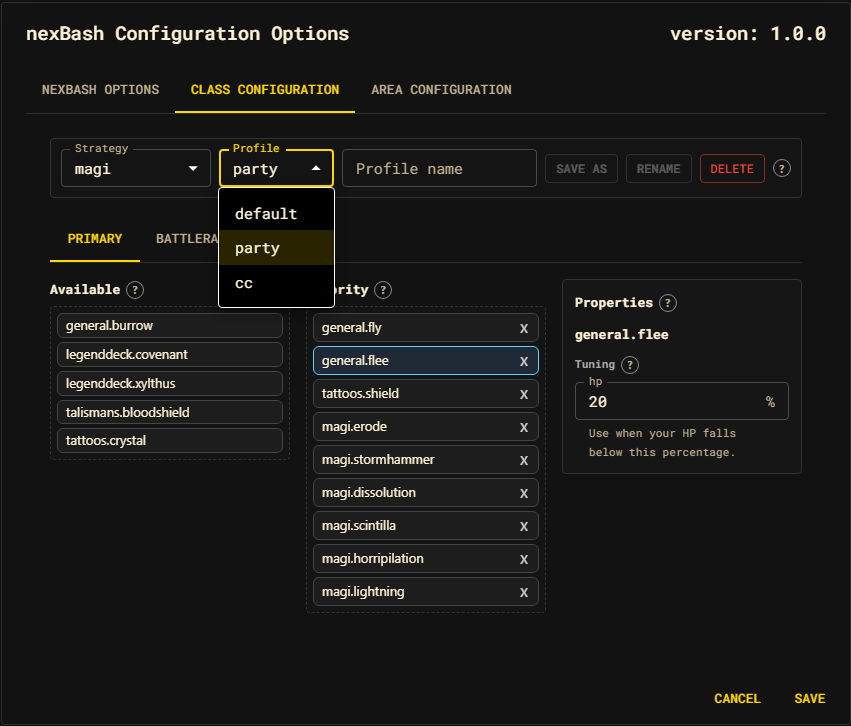
The Class Configuration tab edits one class strategy profile: its shared settings, primary and battlerage membership/order, and action-local tuning.
Strategy toolbar
| Control | Purpose |
|---|---|
| Strategy | Select the class to edit. It initially follows your current supported class. |
| Profile | Select the named complete variant to edit. |
| Profile name + Save as | Fork all current draft edits into a new profile. |
| Rename / Delete | Rename or remove the active profile; default is protected. |
Switching strategy or profile first folds the live editor into its outgoing draft profile. This includes lane order, shared Settings values, and action tuning, so there is no local-state leakage between profiles.
Subtabs
The editor shows the useful subset of:
- Settings: shared strategy args for the active profile. This tab appears only when the strategy declares shared settings.
- Primary: the main action lane.
- Battlerages: the battlerage lane, when the strategy has one.
Settings: shared profile values
Settings are values owned by the whole strategy profile and delivered to every selected primary action and battlerage. Depthswalker's dagger and scythe identities are examples. Metadata supplies a friendly label, help text, group, and input constraints.
Fields may be strings, numbers, integers, booleans, or percentages. Each edit writes directly to the Zustand dialog draft through the strategy-arg action; components do not keep a second local copy and the live combat strategy is not mutated.
Primary and Battlerages: membership and order
Each lane uses three columns:
| Column | Meaning |
|---|---|
| Available | Class-available catalog actions not currently evaluated: the bench. |
| Priority | Effective membership and first-valid order, top to bottom. |
| Properties | Metadata and Tuning for the selected action. |
Drag an action into or out of Priority to change membership, or reorder it to change preference. The order is the membership; there is no separate disabled flag. A customized lane owns its full order, so newly shipped actions appear on the bench rather than being inserted into your priority.
Action Tuning belongs only to the selected catalog action, such as its HP threshold. Shared values are edited once in Settings and are never duplicated across Properties panels. Bench actions remain tunable, and receive the active shared strategy scope automatically if later added to a lane.
How priority resolves
For ordinary lane decisions, nexBash walks the lane top-to-bottom and uses the
first action whose canExecute(ctx, tuning) gate passes. Explicit cross-action
track policies may provide a different pure eligibility rule—for example, Maya
orders damaging battlerages by Rage cost and checks only mechanical availability.
The chosen execute call receives the same precomputed tuning reference. See
The decision model.
Saving and canceling
All fields edit only the dialog draft:
- Save folds the active editor into minimal profile deltas, validates the current schema, applies complete profile sets to runtime, and persists them.
- Cancel discards the draft. Runtime and storage remain untouched.
The canonical strategy delta contains only changed order, strategy args, and
actionArgs. See Strategies and
Profiles.
The screenshot illustrates the overall layout. The installed release is the authority for which conditional subtabs and settings are available.