Landmarks
A landmark is a named shortcut to a room. Once saved, you can travel to it by name from anywhere on the graph. Landmarks are nexMap4-native and persist in your settings.
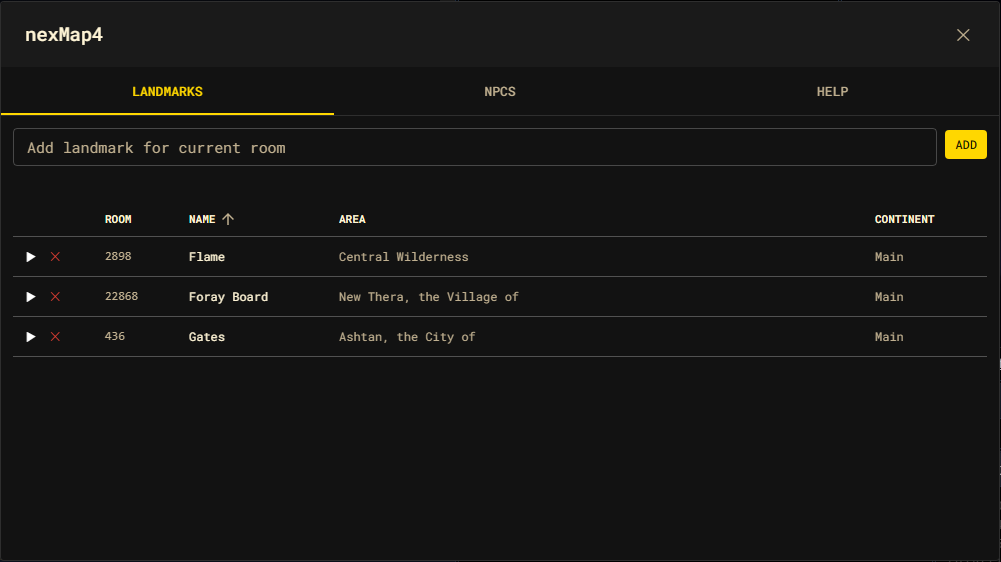
Saving a landmark
Saving captures the current room (or a room id you pass) along with its area and continent, under a name you choose:
nm mark home
nexMap.api.landmarks.add("home");
nexMap.api.landmarks.add("bank", { roomId: 315 });
Names are case-insensitive and unique — saving a name that already exists
replaces the prior entry. Each landmark stores its id, name, roomId,
areaName, and continent.
Traveling to a landmark
nm goto home
nexMap.api.travel.toLandmark("home");
nm goto <name> resolves landmarks too, so it is usually all you need.
The Landmarks panel
Open the shell on the Landmarks tab to manage everything visually:
nm marks        # opens the shell on the Landmarks tab
nm shell
nexMap.api.landmarks.list();          // also opens the panel
nexMap.api.system.openShell("landmarks");
The panel is a sortable table of every saved landmark with Room, Name, Area, and Continent columns. From here you can:
- Add a landmark for the current room using the form at the top.
- Travel to a landmark — click its row, or the ▶ button.
- Delete a landmark with the ✕ button.
Removing a landmark
nm unmark home
nexMap.api.landmarks.remove("home");   // by name…
nexMap.api.landmarks.remove(landmarkId); // …or by id
Where landmarks live
Landmarks are part of the persisted settings document (settings.landmarks),
written through nexMap.settings. Read the current list at any time:
nexMap.settings.get().landmarks;