The map interface
nexMap4 adds a dockable map tab to the Nexus client. The tab is a single React surface with three persistent regions stacked vertically, plus overlay dialogs that float above the map.
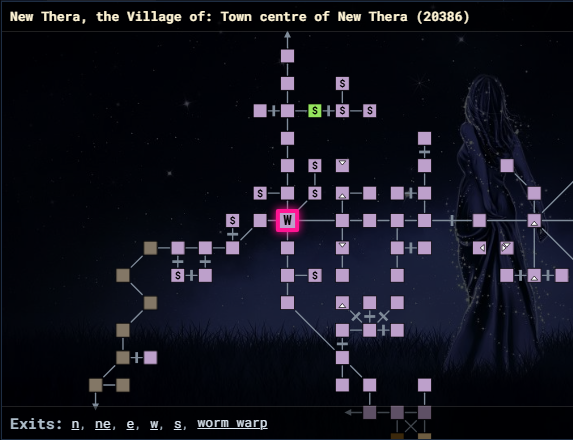
Room header
The header at the top of the tab shows the current location, formatted as:
Area Name: Room Name (roomId)
It reads from the live location snapshot, so it follows you as you move. Before
the graph resolves your room it reads Loading room context.
The map
The map fills the space between the header and footer. It is a renderer-agnostic SVG view of the current area slice (one z-level at a time).
| Interaction | Result |
|---|---|
| Drag | Pan the viewport. |
| Mouse wheel | Zoom in and out. |
| Click a room | Travel to that room. |
Room clicks are wired to travel by default through
nexMap.connectRendererActions(); an integration can repoint them at a
different command. The map reflects your Display settings — current-room
shape and color, room labels, label size, default zoom, the optional background
image, and the outdoor / wormhole border indicators. See
Display settings.
Exits footer
The footer lists every exit of the current room as a clickable button
(Exits: n, e, s, w, …). Clicking an exit moves you that direction. Special
exits that resolve to a specific room (rather than a simple direction) travel to
that room's id instead. When the room has no recorded exits the footer reads
Exits: none.
Overlay dialogs
Three dialogs float above the map and are opened from nm commands or the API:
| Dialog | Opened by | Contents |
|---|---|---|
| Settings | nm config / nexMap.api.system.openSettings() | A modal with the Pathing & Travel, Display, and City Lockouts tabs. |
| Shell | nm shell / nexMap.api.system.openShell(tab) | A draggable window with the Landmarks, NPCs, and Help tabs. |
| Results | search commands / nexMap.api.system.showResults(...) | A draggable table of search hits; a row click travels to the hit. |
The settings dialog is modal — it edits a draft and you commit with Save or discard with Cancel. The shell and results dialogs are modeless and draggable, so you can keep them open beside the map while you play.
Pathing notices
While a route runs, nexMap4 shows brief snackbar toasts at the bottom of the tab ("Pathing to room …", "Arrived at destination", "Path blocked"). These are controlled by the Show pathing notices switch on the Display tab.